
Wise is an international money service that lets eligible customers send, receive, hold, convert, and spend money in different currencies. It is designed for people and businesses that need to manage money across countries.
When you make a transfer, Wise shows the exchange rate, transfer fee, payment options, and estimated delivery time before you confirm. Your recipient usually does not need a Wise account because the money can be delivered directly to their bank account.
Wise also offers multi-currency account features and payment cards in supported countries. However, available services, fees, transfer routes, currencies, and card options depend on where you live.
Important: Always check the live Wise calculator before sending money. Transfer costs and delivery estimates can change based on the currencies, amount, payment method, destination, and your account location.
Wise at a Glance
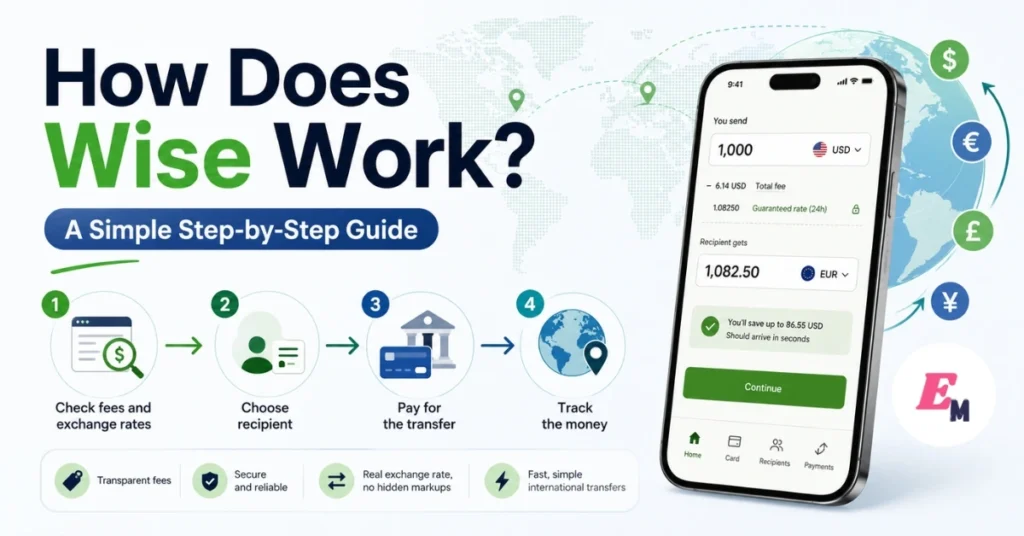
The basic Wise transfer process includes five steps:
- Enter the amount and currencies.
- Review the exchange rate and fees.
- Create or sign in to your account.
- Add the recipient’s details and pay.
- Track the transfer until it arrives.
Wise may also let eligible users hold money, receive payments, use a physical or digital card, split bills, or manage shared spending.
How Wise Works Step by Step
1. Check the Exchange Rate and Transfer Fee
Start by opening the Wise website or mobile app. Choose the currency you have, the currency your recipient needs, and the amount you want to send.
Wise will normally show:
- The amount you are sending
- The currency conversion rate
- The transfer fee
- The amount your recipient should receive
- The available payment methods
- An estimated arrival time
You can usually view an estimated price before creating an account. This makes it easier to compare Wise with your bank or another money-transfer provider. Wise’s pricing page states that fees are displayed before confirmation and that users pay for the services they use rather than a monthly personal-account subscription.
What Exchange Rate Does Wise Use?
Wise says it uses the mid-market exchange rate when converting currencies.
The mid-market rate is the rate between the current buying and selling prices in the global currency market. It is often used as a reference rate on financial websites.
Some banks and transfer companies may add a margin to their exchange rate. Therefore, a transfer advertised as having “no fee” may still cost more through a less favorable rate.
Wise separates the conversion cost from the rate and displays its fee before you approve the transaction. However, the final charge depends on the transfer route and payment method.
Compare the Total Amount Received
Do not compare services by looking only at the stated transfer fee.
Instead, compare the final amount that will reach the recipient. A provider with a low visible fee could offer a weaker exchange rate. Meanwhile, a service with an upfront fee may deliver more money.
For example, imagine two services converting the same amount:
| Provider | Visible Fee | Exchange Rate | Recipient Gets |
|---|---|---|---|
| Provider A | Low | Includes a markup | Lower amount |
| Provider B | Upfront fee | Closer to mid-market rate | Higher amount |
This is only an example. Always compare live quotes because rates and fees change.
2. Create Your Wise Account
After reviewing the estimated cost, you can create a personal Wise account with your email address, Apple account, Google account, or another available sign-up method.
Opening a personal Wise account is generally free, and Wise says personal accounts do not have monthly subscription fees. Business account charges may be different and can include an account-opening or setup fee in some regions.
During registration, you may need to provide:
- Your legal name
- Date of birth
- Residential address
- Mobile phone number
- Country of residence
- Intended account use
Make sure this information matches your identification documents. Differences in names, addresses, or dates can delay verification.
Complete Identity Verification
Wise may ask you to verify your identity before you send money, receive certain payments, order a card, or unlock other features.
Depending on your location, you may need to provide:
- A passport
- National identity card
- Driving licence
- Proof of address
- A live photo or selfie
- Information about your income or transfer purpose
- Business registration documents for a company account
Wise says personal document reviews commonly take around one or two working days after it receives the required documents. However, some cases take longer, especially when more information is needed. Business verification can also require additional checks.
Complete verification early when you are planning a time-sensitive or high-value transfer. Waiting until the payment deadline could create an avoidable delay.
3. Add the Recipient’s Details
Next, choose who should receive the money.
Depending on the supported transfer route, you may be able to send money to:
- Your own bank account
- A family member
- A friend
- A freelancer
- A supplier
- A company
- Another Wise user
For a bank deposit, you will usually need the recipient’s full legal name and local bank information. The exact fields depend on the destination.
You may be asked for:
- Account holder’s name
- Bank name
- Account number
- IBAN
- Sort code
- Routing number
- SWIFT or BIC code
- Recipient’s address
- Reason for the transfer
Your recipient will often only need a supported bank account. They do not normally need to open a Wise account to receive a standard bank transfer.
Double-Check Every Detail
An incorrect account number, spelling error, or routing code can delay the transfer. In some cases, the receiving bank may reject the payment.
Before continuing:
- Ask the recipient to confirm their details.
- Match the recipient’s name with the bank account.
- Check the destination currency.
- Confirm whether the account accepts that currency.
- Review all numbers before submitting.
For a large transfer, consider sending a smaller test payment first when practical.
4. Choose How to Pay for the Transfer
Wise will show the payment methods available for your transfer. These options depend on your country, currencies, amount, and account type.
Possible methods may include:
- Bank transfer
- Debit card
- Credit card
- Money already held in your Wise account
- Open-banking payment
- Apple Pay or Google Pay in supported cases
- Other local payment methods
Each method may have a different fee and delivery time. For example, card payments can be processed quickly but may cost more. A local bank transfer may have a lower Wise fee, although your bank could take longer to send the funds.
Review the comparison displayed by Wise before selecting a method. The cheapest option is not always the fastest option.
Watch for Charges From Other Companies
Wise displays its own charge before you confirm. However, another bank, card issuer, ATM operator, or intermediary may apply a separate fee.
Your credit card company could also treat a money transfer as a cash-like transaction. Therefore, check your card provider’s terms before paying with credit.
5. Confirm and Track Your Transfer
After you pay, Wise processes the transaction and provides a delivery estimate.
Transfer speed depends on factors such as:
- The currencies involved
- Your payment method
- The time and day you pay
- Banking hours
- Public holidays
- Verification checks
- The receiving bank
- Local payment-system rules
- Incorrect or incomplete recipient details
Some transfers may arrive quickly, while others take one or more working days. The estimate shown for your specific transfer is more useful than a general speed claim.
You can usually follow the transfer from your account or mobile app. Wise may also notify the recipient when the payment is on its way if you provide their email address.
Why Wise Can Be Different From a Traditional Bank Transfer
A traditional international bank transfer may travel through the SWIFT network and one or more intermediary banks. Each institution can add processing time or fees.
Wise uses a network of local payment connections. Where supported, it can collect money locally in the sending country and pay the recipient through a local route in the destination country.
As a result, the entire payment may not need to move across borders through the same chain used by a traditional international wire. The exact route depends on the currency pair, country, regulations, and available payment systems.
Can You Hold and Receive Money With Wise?
Eligible Wise customers can hold and convert money in more than 40 currencies. Depending on their location, they may also receive local account details for selected currencies, including major currencies such as GBP, EUR, and USD.
These details may be useful for:
- Receiving freelance payments
- Collecting a salary from abroad
- Getting paid by international clients
- Receiving marketplace payouts
- Managing travel money
- Paying overseas expenses
- Holding funds before converting them
Account details, receiving fees, and supported payment types vary by currency and country. Check the receiving-money section of your account before sharing details with a payer.
Practical Example
Suppose a UK client needs to pay a freelancer who has eligible GBP account details through Wise.
The freelancer can share those GBP details with the client. The client may then send a local GBP payment instead of arranging a separate international wire.
After the money arrives, the freelancer may be able to hold it in GBP, convert it to another supported currency, send it to a bank account, or spend it with an eligible Wise card.
How the Wise Card Works
Wise offers debit cards to eligible customers in supported countries. Card availability, ordering charges, delivery costs, ATM allowances, replacement fees, and spending limits depend on where the card is issued.
You can use an eligible card for:
- In-store purchases
- Online shopping
- Travel expenses
- Contactless payments
- ATM withdrawals
- Spending money held in supported currencies
When you already hold the purchase currency, Wise can take the payment from that balance. Otherwise, it may convert money from another available balance using its automatic conversion process.
Physical and Digital Wise Cards
Eligible users may be offered a physical card, digital card, or both.
A digital card can be useful for online payments. In supported countries and on compatible devices, eligible cards may also be added to mobile wallets such as Apple Pay or Google Pay.
Do not assume that the card has one fixed global price. The ordering and delivery charge shown in one country may not apply elsewhere.
ATM Fees and Limits
Wise card ATM allowances and charges differ by issuing country. In addition, the ATM owner can apply its own fee.
Before withdrawing cash:
- Check your remaining Wise allowance.
- Read the ATM fee warning.
- Avoid unnecessary currency conversion by the ATM.
- Select the local currency when asked.
- Review your account’s current withdrawal limits.
Wise provides region-specific ATM pricing in its account and Help Centre.
Sending Large Amounts With Wise
Wise can support larger transfers on eligible routes. However, the company may ask for documents that explain where the money came from and why it is being transferred.
For example, documents may be requested for:
- A property sale
- An inheritance
- Business revenue
- Investment proceeds
- Salary savings
- A vehicle sale
- A legal settlement
Prepare clear records before starting. These may include bank statements, contracts, tax documents, payslips, sale agreements, or investment statements.
Read Also: Wise Review 2026: Is It the Best Way to Send Money Abroad?
Verification is a normal part of regulated financial services. Therefore, provide accurate documents and respond quickly if the compliance team asks for more information.
Shared Spending With “Spend With Others”
“Spend with others” is a Wise feature that lets eligible personal customers create a group for shared expenses.
It is not the same as a traditional joint bank account. One person is the owner and controls the group’s access and money. Invited members have more limited permissions.
The feature can be useful for:
- Household shopping
- Shared rent costs
- Family spending
- Group travel
- Expenses with a partner
- Managing a shared activity budget
Wise currently offers this feature only in certain regions. Its official eligibility list includes personal customers in Australia, Brazil, the European Union, Malaysia, New Zealand, Singapore, Switzerland, the United Kingdom, and the United States. Some cross-border group options are also available under specific conditions.
Because eligibility can change, check your Wise app for the options available to your account.
Splitting Bills With Wise
Wise’s Bill Split feature lets personal-account users divide eligible expenses with friends or family.
You can split an amount equally or enter a different share for each person. Existing Wise users can receive a request in the app. When someone does not use Wise, you may be able to create a payment-request link for them.
Common uses include:
- Restaurant bills
- Hotel bookings
- Group flights
- Holiday costs
- Rent
- Utility bills
- Event tickets
Bill Split is listed as available for Wise personal consumer accounts globally, but it is not currently offered for Wise Business accounts.
Young Explorer Cards for Children
Young Explorer is a parent-managed Wise card for children aged 6 to 17.
The parent controls the money and can set funds aside for the child. The child does not receive independent bank account details and cannot add money without the parent or another permitted adult.
Wise currently lists Young Explorer availability for eligible account holders in:
- Australia
- Brazil
- New Zealand
- Singapore
- Switzerland
- United Kingdom
Children can use the card for supported in-store and online purchases. ATM use is also available in many supported locations, although exceptions apply. Parents can set daily and monthly spending limits.
Children aged 13 or older may be able to add the card to Apple Pay or Google Pay where supported.
Does Wise Have a Referral Program?
Wise may offer referral rewards to eligible customers. However, the required number of referrals, qualifying transfer amount, reward type, and maximum payment can differ between users and countries.
Therefore, avoid relying on an amount mentioned in an old article or another person’s account.
Open your personal invitation page to see:
- Your current reward
- How many friends must qualify
- The minimum eligible transfer
- The campaign deadline
- Excluded payment types
- The terms for your region
Only promote the exact offer displayed in your account.
Is Wise Safe?
Wise operates through regulated entities in different countries. It says that customer money is protected through safeguarding or similar local protection arrangements, depending on the entity serving the account.
Safeguarding generally means customer funds are kept separate from the money used to operate the company. Wise may hold protected funds in cash, secure liquid assets, government bonds, or other arrangements allowed by the relevant regulator.
However, a Wise account is not identical to a traditional bank account. In some regions, safeguarded funds are not protected through the same deposit-insurance scheme that covers ordinary bank deposits.
Basic Wise Security Tips
Protect your account by following these practices:
- Use a unique password.
- Enable available two-step security features.
- Never share a verification code.
- Check the website address before signing in.
- Avoid links sent by unknown people.
- Review recipient details carefully.
- Contact official support if a request appears suspicious.
- Freeze your card immediately if it is lost.
- Never let another person control your verified account.
Wise support should not need your password or full security code.
Wise Advantages and Disadvantages
| Advantages | Possible Disadvantages |
| Upfront transfer pricing | Fees vary by payment method |
| Mid-market exchange rate for currency conversion | Not every currency route is supported |
| Recipient often does not need Wise | Verification may delay some transfers |
| Multi-currency features for eligible users | Card availability depends on location |
| Physical and digital card options in supported regions | ATM operators may add separate charges |
| Transfer tracking and estimated delivery time | It is not the same as a traditional bank account |
| Personal accounts generally have no monthly fee | Some services have regional restrictions |
Common Mistakes to Avoid
Using the Wrong Recipient Details
Even one incorrect number may delay or return a payment. Copy the details carefully and ask the recipient to confirm them.
Looking Only at the Transfer Fee
Always compare how much the recipient receives. The exchange rate can matter more than the visible fee.
Choosing the Fastest Payment Method Without Checking the Price
A card payment may be faster but more expensive than a bank transfer. Compare all available methods before paying.
Ignoring Verification Until the Last Minute
Complete identity checks before an urgent deadline. A document review can take longer when Wise requires additional information.
Accepting an ATM’s Currency Conversion
An overseas ATM may offer to charge your home currency. This is known as dynamic currency conversion and can include a poor rate. Choose the local currency when possible.
Sending Large Amounts Without Documents
Prepare proof of your source of funds before transferring money from property, investments, savings, or business income.
Who May Find Wise Useful?
Wise may be suitable for:
- International freelancers
- Remote workers
- Travelers
- People living abroad
- Families sending money overseas
- Students studying internationally
- Online sellers
- Importers and exporters
- Companies paying overseas contractors
- People receiving supported foreign currencies
It may be less suitable when the required destination, currency, funding method, or account feature is not supported.
Final Verdict: How Does Wise Work?
Wise works by letting you enter a transfer amount, review the current exchange rate and fee, provide the recipient’s bank information, select a payment method, and track the payment.
Its main advantage is transparency. You can normally see the conversion rate, fee, recipient amount, and estimated delivery time before confirming.
In addition, eligible customers can hold and receive different currencies, use Wise cards, divide expenses, and manage certain shared spending needs. Nevertheless, features and prices are not identical worldwide.
Before using Wise, check the live calculator, regional pricing page, transfer limits, card eligibility, and current terms. That final check helps you choose the most suitable and affordable transfer method.
Frequently Asked Questions
Does the Recipient Need a Wise Account?
No. For many supported bank-transfer routes, the recipient only needs a valid bank account. You enter their bank details, and Wise sends the money to that account.
How Much Does a Wise Transfer Cost?
The cost depends on the amount, currency pair, destination, payment method, and account location. Wise displays its fee and exchange rate before you confirm.
How Long Does Wise Take to Send Money?
Some transfers arrive quickly, while others take one or more working days. The payment method, currencies, banking hours, verification requirements, and recipient bank can affect the delivery time.
Can I Use Wise Without Ordering a Card?
Yes. A card is not required for sending international transfers. Card availability is a separate feature for eligible users in supported locations.
Is Wise a Bank?
Wise is not a traditional bank in many markets. It operates through regulated entities and generally protects customer funds through safeguarding or equivalent local arrangements rather than offering a standard bank deposit account.
Image Suggestions and SEO-Friendly Alt Text
| Article Section | Suggested Image | SEO-Friendly Alt Text |
| Introduction | Wise dashboard showing a transfer estimate | Wise international money transfer calculator showing exchange rate and transfer fee |
| Step-by-step process | Five-step transfer process infographic | How Wise works for international transfers in five simple steps |
| Exchange rates | Currency conversion screen comparing two currencies | Wise mid-market exchange rate and currency conversion example |
| Account creation | User completing verification on a phone | How to create and verify a Wise account using a mobile phone |
| Recipient and payment | Transfer form with bank-detail fields | Adding recipient bank details for a Wise money transfer |
| Wise card | Physical and digital payment card illustration | Wise physical and digital cards for international spending |
| Shared spending | Friends dividing restaurant and travel expenses | Wise Bill Split feature for shared expenses with friends |
| Security | Secure payment dashboard with verification symbol | Wise account security and international transfer protection features |
SEO Improvement Notes
Internal Linking Opportunities
Add contextual links to related website content such as:
- Wise account creation service
- Wise Business account guide
- Wise card review
- Wise versus Payoneer
- Wise versus PayPal
- Wise versus traditional bank transfer
- How to receive international client payments
- Best digital wallets
- International freelancer payment methods
- Currency conversion fee guide
Use descriptive anchor text. For example, use “compare Wise and Payoneer fees” rather than “click here.”
External Authority Sources
Link only where the source helps readers confirm important information.
Recommended sources include:
- Wise regional pricing page
- Wise Help Centre
- Wise card eligibility page
- Wise safeguarding information
- The financial regulator serving the reader’s country
- Official Apple Pay and Google Pay support pages
Open external links in the same tab unless your website policy requires otherwise.
Recommended Schema Markup
Use:
- Article schema
- FAQPage schema
- BreadcrumbList schema
- Organization schema
- WebPage schema
Do not use Review or Product schema unless the page includes a genuine review or directly offers an eligible product.
Featured Snippet Opportunities
The strongest snippet targets are:
- The five-step “How Wise works” list
- The 60–80-word definition in the introduction
- The Wise advantages and disadvantages table
- “Does the recipient need a Wise account?”
- “How much does a Wise transfer cost?”
- “Is Wise a bank?”
Keep the main answer directly below each question heading.
Readability Improvements
This version uses:
- Short paragraphs
- Clear sentence structures
- Active voice
- Numbered instructions
- Comparison tables
- Natural transition words
- Descriptive headings
- Limited technical language
- Explanations of unfamiliar financial terms
For Yoast or Rank Math, keep most sentences below 25 words where natural. Do not force transition words into sentences where they reduce clarity.
Core Web Vitals Recommendations
- Convert article images to WebP or AVIF.
- Compress each image before uploading.
- Add fixed width and height attributes.
- Lazy-load below-the-fold images.
- Do not lazy-load the main featured image.
- Preload only the most important hero image.
- Avoid oversized page-builder scripts.
- Reduce unused CSS and JavaScript.
- Use a fast server and page caching.
- Keep mobile pop-ups small and easy to close.
- Reserve space for ads to prevent layout shifts.
On-Page SEO Recommendations
Place the focus keyword in:
- SEO title
- Meta description
- URL
- First 100 words
- One early H2 heading
- One FAQ question
- Featured image alt text
Also add:
- A table of contents
- Author name and biography
- Original publication date
- Last reviewed date
- Financial-information disclaimer
- Visible source references
- Clear call-to-action
- Breadcrumb navigation
Avoid repeating the focus keyword unnaturally. Related phrases should carry most of the semantic relevance.
Entity Optimization
Include these connected entities naturally:
- Wise
- International money transfer
- Mid-market exchange rate
- Multi-currency account
- Wise card
- Digital card
- Recipient bank account
- Currency conversion
- Identity verification
- Safeguarding
- Apple Pay
- Google Pay
- International banking
- Transfer fee
- SWIFT payment
NLP Optimization
Use related language throughout the page, including:
- Send money abroad
- Receive foreign currency
- International payment
- Bank transfer
- Exchange-rate markup
- Transfer delivery estimate
- Payment method
- Account details
- Transfer tracking
- Currency balance
- Recipient information
- Source-of-funds documents
- Regional availability
- Financial regulations
These phrases improve topical depth without repeating the same keyword.
Editorial and Compliance Notes
Keep a visible disclaimer such as:
Fees, exchange rates, transfer times, supported currencies, card availability, and account features vary by location and may change. Check Wise’s official website for current information before making a financial decision.
Do not describe Wise as completely free. Do not promise guaranteed transfer times or savings. In addition, avoid publishing fixed card prices, ATM allowances, or referral rewards unless you have checked the user’s country and current offer.
The article has been rewritten from scratch rather than lightly paraphrased. Before publication, run it through your normal editorial, legal, plagiarism, and factual-review process.
Frequently Asked Questions About Wise
Wise lets you send money internationally using local banking networks where available. You enter the amount, choose the currencies, add the recipient’s bank details, select a payment method, and confirm the transfer. Wise shows the exchange rate, fee, and estimated delivery time before you pay.
No. In most cases, the recipient does not need a Wise account. They only need a supported bank account in their country. Wise deposits the transferred money directly into the recipient’s bank account.
Wise fees depend on the amount, currency pair, payment method, and destination country. Bank transfers are often cheaper than card payments. The exact fee appears before you confirm the transaction, so you can review the total cost in advance.
Wise generally uses the mid-market exchange rate for currency conversion. This is the rate commonly seen on financial websites. Instead of adding a hidden markup to the exchange rate, Wise normally displays its currency conversion fee separately.
Some Wise transfers arrive within seconds or minutes, while others may take one or more working days. Transfer time depends on the currencies, payment method, verification status, banking hours, public holidays, and recipient’s bank.
Wise operates through regulated financial entities in supported countries. It uses security measures such as identity verification, account monitoring, and two-step authentication. Customers should also use a strong password and never share verification codes.
Wise is not a traditional bank in many countries. It is a regulated financial technology company that provides international transfers, currency conversion, account details, and card services. The legal protections available depend on the country where your account is registered.
Eligible customers can hold and convert money in multiple supported currencies. Available currencies and account features depend on the user’s country. You can check your Wise account to see which currency balances are available.
Yes. Eligible users can receive money using account details provided for supported currencies. These details may help freelancers, remote workers, businesses, and international students receive payments from other countries.
Yes. Wise Business can be used for international supplier payments, employee payments, client payments, currency conversion, and business expenses. Business features, fees, and eligibility vary by country.
Wise offers physical and digital debit cards in supported countries. The card can be used for online purchases, in-store payments, travel spending, and ATM withdrawals. Card fees and withdrawal limits depend on the issuing country.
Eligible Wise cards can be added to Apple Pay or Google Pay in supported countries and on compatible devices. Availability depends on your location, card type, and mobile-wallet support.
Yes. You can withdraw money from supported ATMs using an eligible Wise card. Wise may provide a limited number of free withdrawals or a free monthly allowance, depending on your country. The ATM operator may charge an additional fee.
You may be able to cancel a transfer if Wise has not completed or paid it out. Once the money has reached the recipient’s bank account, cancellation is usually not possible. Check the transfer status in your Wise account immediately.
Incorrect recipient details can delay, reject, or misdirect a payment. Contact Wise support as soon as possible if you notice a mistake. You should always confirm the recipient’s name, account number, IBAN, routing number, and currency before sending money.
Personal Wise accounts generally do not have a monthly subscription fee. However, certain services may have charges, including currency conversion, card ordering, ATM withdrawals, receiving certain payments, and international transfers.
Wise supports large transfers on eligible currency routes. However, transfer limits vary by country and payment method. Wise may also request documents showing the source of the money, such as bank statements, payslips, contracts, or property-sale documents.
Wise may be cheaper than some traditional banks because it generally uses the mid-market exchange rate and displays its fees upfront. However, costs vary by transfer. Compare the final amount the recipient receives rather than looking only at the advertised fee.
Yes. Eligible users can hold supported currencies and use the Wise card for overseas purchases. When you already hold the required currency, Wise can take the payment from that balance. Otherwise, it may automatically convert another available balance.
Wise may request a passport, national identity card, driving licence, proof of address, selfie, or information about the purpose of a transfer. Business users may also need to provide company registration and ownership documents.